AdonisJS Starter Kit
AdonisJS Starter Kit is a monorepo-based template for developing full-stack applications with AdonisJS. It combines AdonisJS, Inertia.js, Tuyau, a shared UI package based on shadcn/ui, Tailwind CSS, and PostgreSQL to help you bootstrap production-ready applications faster.
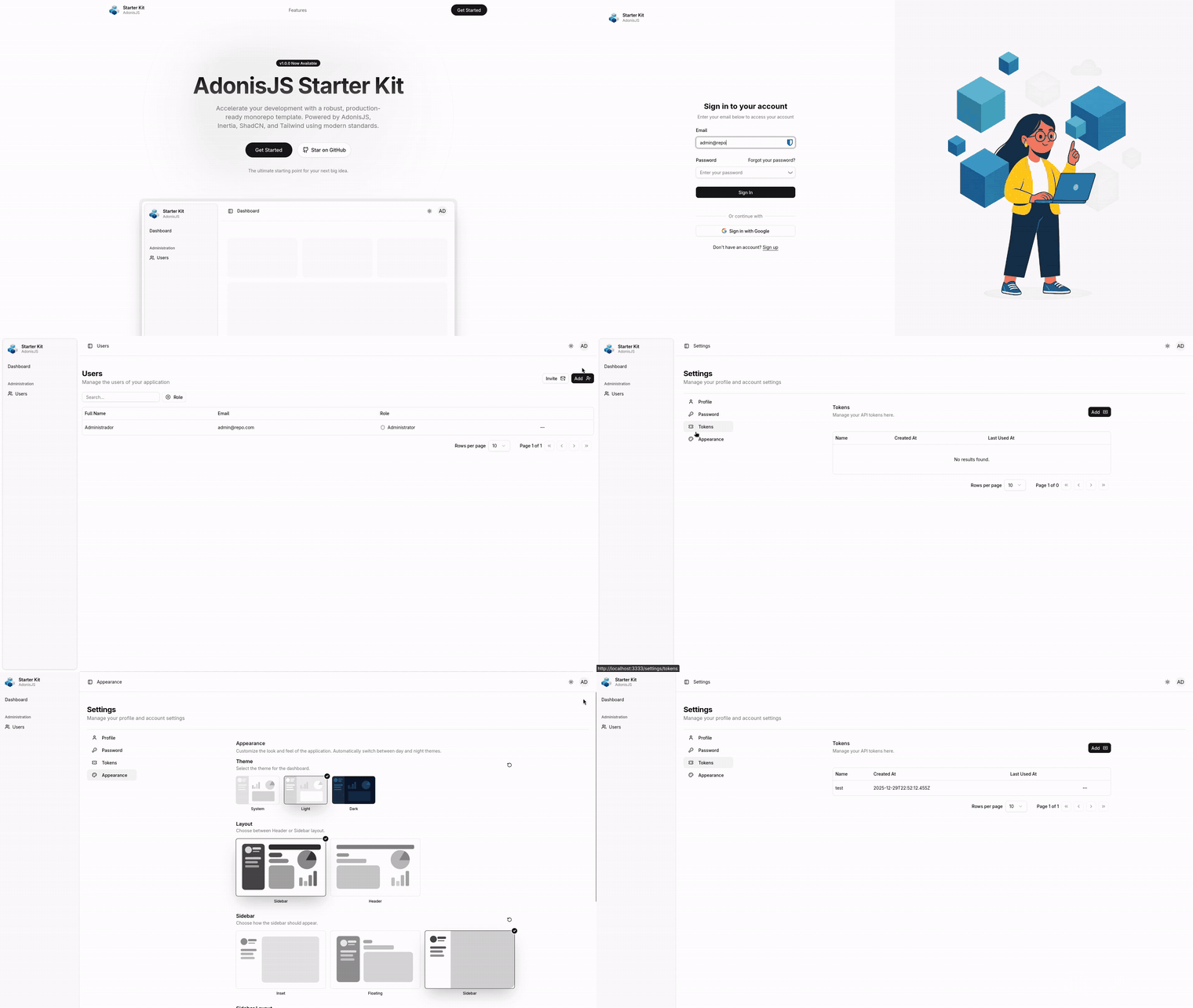
Why this exists
Personal starter kit I use to prototype projects with coding agents, and that my students use for their capstone projects. The idea: clone it and you already have auth, UI, i18n, RBAC, layout shells, tests, and CI wired up — go straight to the interesting part. Every decision here optimizes for starting clean over configuring at runtime; the pieces a given project doesn't need (say, the admin dashboard) come off by deletion, not by refactor.
What's inside
Backend — AdonisJS 7 with session auth + Bouncer authorization + Lucid ORM + VineJS validation, rate limiting (@adonisjs/limiter), mail, drive, file uploads with derived variants (@jrmc/adonis-attachment), social auth (@adonisjs/ally) with Google preconfigured, API tokens for programmatic access.
Frontend — Inertia + React 19, Tuyau for type-safe URLs and API calls, shared UI package built on shadcn/ui + Tailwind 4, Inertia-native modals (adonis-inertia-modal), theme (light/dark/system) via ThemeProvider, language switcher wired to the backend.
Layout shells — Purpose-built shells that coexist as distinct components — admin_layout (sidebar), authenticated_layout (top-nav), auth_layout (split-screen), marketing_layout (public). Pages import the shell they need. Delete the ones you don't use — no refactor required.
Notifications + SSE — In-app notifications persisted in Postgres and streamed in realtime over Server-Sent Events (@facteurjs/adonisjs + @adonisjs/transmit). Bell + unread badge wired into the top nav, notification classes per domain (app/<mod>/notifications/), delivery via event listeners so actions stay pure. Demo: UserWelcomeNotification fires on user:registered.
i18n — English, French, and Portuguese out of the box. Locale is a user preference persisted on the User model and synced to a cookie on login, so it follows the user across devices.
RBAC — Static catalog of typed capabilities (PERMISSIONS) + role slugs (ROLES) enforced through Bouncer abilities and per-resource policies. Frontend consumes a typed useCan() hook. User impersonation is available to admins.
Data + infra — PostgreSQL 16 with Mailpit and pgAdmin, brought up with pnpm infra:up.
DevX — Turbo monorepo caching, pnpm ace shortcut for the Adonis CLI from anywhere, hot reload via hot-hook, Vite HMR for the frontend, Prettier + ESLint scoped per package.
Testing + CI — 166 spec-based tests (Japa) running against a real Postgres wrapped in a per-test transaction, factories, mandatory fakes (drive.fake, mail.fake, emitter.fake) and Sinon stubs. Coverage runs via c8 and shows up in the PR summary automatically. GitHub Actions CI on every push and pull request.
Coding-agent skills — @workspace/skills package ships shareable skills for Claude Code, OpenCode, and Cursor in the Vercel Skills format. Install with npx skills add ./packages/skills. 14 skills covering module scaffolding, CRUD, queries (list + read models), actions/events, testing, Inertia, i18n, layout shells, authorization, mail, notifications, attachment, migrations, and semantic commits.
Requirements
- Node.js
>=24 - pnpm
11.9.0— activated automatically viacorepackfrom thepackageManagerfield inpackage.json
Quick start
Create a project from this starter:
pnpm create adonisjs@latest -K="filipebraida/adonisjs-starter-kit"
Or clone directly:
git clone https://github.com/filipebraida/adonisjs-starter-kit.git
cd adonisjs-starter-kit
pnpm install
Set up env, key, and database:
cp apps/web/.env.example apps/web/.env
pnpm ace generate:key
pnpm infra:up
pnpm ace migration:run
pnpm ace db:seed
Run the dev server:
pnpm dev
pnpm ace <cmd>is a root shortcut forpnpm --filter web exec node ace <cmd>— runs from anywhere in the monorepo with the correct working directory.Some features (email, social auth, file storage) are optional but their environment variables must still be present with placeholder values due to startup validation.
.env.examplealready includes every required placeholder.Tear down infra later with
pnpm infra:down.
Project structure
root/
├── apps/
│   └── web/                 # Full-stack AdonisJS + Inertia app
├── packages/
│   ├── ui/                  # Shared shadcn/ui-based components
│   ├── skills/              # Skills for coding agents (Vercel format)
│   ├── eslint-config/
│   └── typescript-config/
├── pnpm-workspace.yaml
└── turbo.json
- apps/ — runnable applications.
web/is the full-stack AdonisJS app (backend + Inertia frontend). - packages/ — shared libraries and tooling.
- pnpm-workspace.yaml defines workspace boundaries.
- turbo.json configures TurboRepo pipelines (build, lint, test, dev).
Feature-based organization
Inside apps/web/app/, the codebase is organized by domain (auth, users, marketing, analytics, common, core) instead of by technical type. Related controllers, actions, validators, UI components, hooks, routes, tests, and i18n keys all live together under one module.
Example:
apps/web/app/
├── auth/
│   ├── actions/
│   ├── controllers/
│   ├── middleware/
│   ├── routes.ts
│   └── ui/
├── users/
│   ├── controllers/
│   ├── policies/
│   ├── routes.ts
│   ├── validators.ts
│   └── ui/
Full architectural conventions (module invariants, aliases, gotchas) live in AGENTS.md.
Testing & CI
pnpm test        # full suite (~9s locally)
pnpm typecheck   # tsc across apps + packages
pnpm lint        # eslint + prettier
Tests run against a real Postgres wrapped in a per-test transaction, so factories create real rows and rollbacks are automatic. Fakes for drive, mail, and emitter are mandatory whenever the code under test would otherwise reach out. Coverage via c8 posts to the PR summary in GitHub Actions.
Authorization
Role-based access control lives at apps/web/app/users/enums/. PERMISSIONS is the single source of truth for every capability the app supports (e.g. users.create, tokens.view_list); ROLES are role slugs with weights. Controllers gate with bouncer.authorize('hasPermission', PERMISSIONS.usersCreate) or through a resource policy; the frontend uses a typed useCan() hook. Escalation is protected in depth — SyncUserRoles refuses to remove the executor's own admin role and requireManageRolesIfEscalating guards create/invite paths.
Adding a shadcn component
Shared components live in packages/ui. To add a new shadcn base component:
pnpm dlx shadcn@latest add button --cwd packages/ui
Custom project-specific components on top of shadcn (field, password-input, copy-button, data-table) are maintained manually.
Libraries used
Beyond the AdonisJS 7 defaults, this starter kit leans on a small set of libraries that shape the developer experience:
- @jrmc/adonis-attachment — file uploads with derived variants (e.g., avatar thumbnails).
- @tuyau/inertia — type-safe route generation and API client shared between backend and Inertia pages.
- adonis-inertia-modal — Inertia-native modal stack (used for
users/createandusers/editoverusers/index). - @vinejs/vine — server-side validation, wired into
request.validateUsing(...)and reused for typed frontend errors viauseForm.
Inspirations
- shadcn/ui
- AdonisJS Starter Kit by Batosai
- shadcn Blocks
- shadcn Admin by Satnaing
- Laravel React Starter Kit
Contributing
Contributions are welcome — please open issues or submit pull requests with improvements.
Contributors: Sayed Ahmed, Lupiac, Corentin Clichy.
License
MIT — see LICENSE.